These two entries recently were added to the Knowledge Base. I am sure that some will be helped by them...
Running Survey Link from Civil 3D
Adding Survey Link to Survey menu in Civil 3D
The second item is the same Survey Link that is launched by the C3D Extensions CUI that my co-worker Jerry Bartels created and has shared. Pete Kelsey recently blogged a link to Jerry's CUI and Tool Palette additions.
Be Better!
Showing posts with label CUI. Show all posts
Showing posts with label CUI. Show all posts
Thursday, January 10, 2008


Wednesday, December 06, 2006
Want To Double Pick or Right-Click Edit?
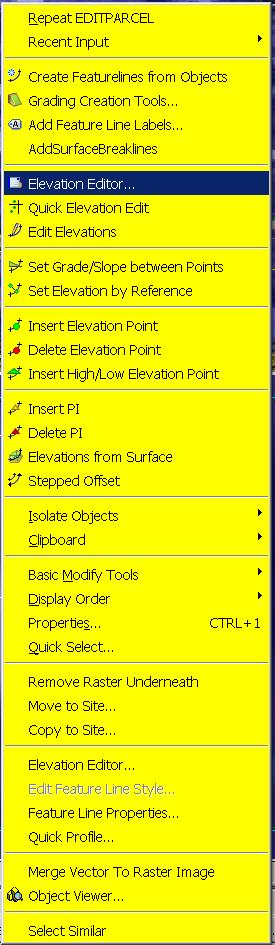
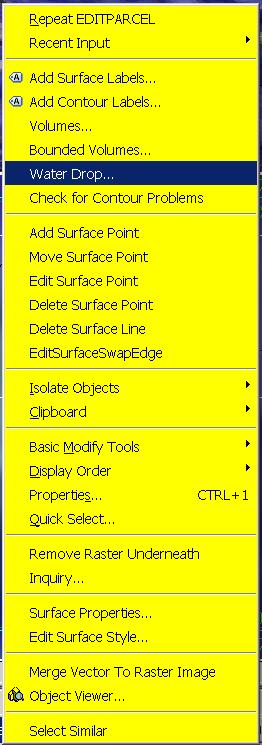 One of my favorite classes at Autodesk University 2006 (last week) was given by my friend David Garrigues. During the class he described how he had created a CUI with custom Right-Click menus (many commands per object type) and the ability to Double-Pick on an AECC object (Alignment, Surface etc.) and bring up the object's Properties Dialog Box, instead of the AutoCAD Properties Palette. This gives users of this CUI a quicker way to create, edit, interact with, and control their Civil 3D objects. The images to the left show what you see if you bring up the right-click menu while selecting a Surface and Feature Line respectively.
During the class, David mentioned that he would make this CUI available. The simplest way to do so was for him to post it in the "Content Sharing" section of the "Civil Engineering Community" website. It is located in the "Utilities" area of "Content Sharing". It is titled:
"Double and Right Click CUI"
You must be registered and login to the site in order to download this CUI.
Download it and follow the instruction from the readme file to get it installed properly. I have already done so and it makes life a bunch easier.
Thanks Dave!!
Wednesday, June 21, 2006
2007 New, Changed, and Obsolete Commands
Autodesk has posted in the knowledge base all of the following information for New, Changed and Obsolete Commands
New Commands
Command - Description
3DALIGN - Aligns objects with other objects in 2D and 3D.
-3DCONFIG - Provides a command line interface to the 3D graphics system's configuration settings.
3DDWF - Displays the Export 3D DWF dialog box.
3DFLY - "Activates fly-through mode and enables you to navigate in any direction including off the XY plane."
3DFORBIT - "Controls the interactive viewing of objects in 3D, using an unconstrained orbit."
3DMOVE - Displays the move grip tool in a 3D view and moves objects a specified distance in a specified direction.
3DROTATE - Displays the rotate grip tool in a 3D view and revolves objects around a base point.
3DWALK - Interactively changes the view of a 3D drawing so that you appear to be walking through the model.
AECTOACAD - Creates a new DWG file with all AEC objects exploded.
ANIPATH - Saves an animation along a path in a 3D model.
BREP - Removes the history from 3D solid primitives and composite solids.
CHSPACE - "Moves objects from model space to paper space, or vice versa. (Integrated Express Tool)"
CONVERTOLDLIGHTS - Converts lights created in previous releases to lights in AutoCAD 2007 format.
CONVERTOLDMATERIALS - Converts materials created in previous releases to materials in AutoCAD 2007 format.
CONVTOSOLID - Converts polylines and circles with thickness to 3D solids.
CONVTOSURFACE - Converts objects to surfaces.
COPYTOLAYER - Copies one or more objects to another layer. (Integrated Express Tool)
-COPYTOLAYER - Copies one or more objects to another layer. (Command line version)
DASHBOARD - Opens the Dashboard window.
DASHBOARDCLOSE - Closes the Dashboard window.
DISTANTLIGHT - Creates a distant light.
DWFADJUST - Allows adjustment of a DWF underlay from the command line.
DWFATTACH - Attaches a DWF underlay to the current drawing.
DWFCLIP - Uses clipping boundaries to define a subregion of a DWF underlay.
EXTERNALREFERENCES - Displays the External References palette.
EXTERNALREFERENCESCLOSE - Closes the External References palette.
FLATSHOT - Creates a 2D representation of all 3D objects in the current view.
GEOGRAPHICLOCATION - Specifies the latitude and longitude of a location.
HELIX - Creates a 2D or 3D spiral.
IMPRINT - Imprints an edge on a 3D solid.
-INTERFERE - Highlights 3D solids that overlap. (Command line version)
JOGSECTION - Adds a jogged segment to a section object.
LAYCUR - Changes the layer of selected objects to the current layer. (Integrated Express Tool)
LAYDEL - "Deletes the layer of a selected object and all objects on the layer, and then purges the layer from the drawing. (Integrated Express Tool)"
-LAYDEL - "Deletes the layer of a selected object and all objects on the layer, and then purges the layer from the drawing. (Command line version)"
LAYFRZ - Freezes the layer of selected objects. (Integrated Express Tool)
LAYISO - Isolates the layer of selected objects so that all other layers are turned off. (Integrated Express Tool)
LAYLCK - Locks the layer of selected objects. (Integrated Express Tool)
LAYMCH - Changes the layer of a selected object to match the destination layer. (Integrated Express Tool)
-LAYMCH - Changes the layer of a selected object to match the destination layer. (Command line version)
LAYMCUR - Makes the layer of a selected object current. (Renamed AI_MOLC)
LAYMRG - Merges selected layers onto a destination layer. (Integrated Express Tool)
-LAYMRG - Merges selected layers onto a destination layer. (Command line version)
LAYOFF - Turns off the layer of the selected object. (Integrated Express Tool)
LAYON - Turns on all layers. (Integrated Express Tool)
LAYTHW - Thaws all layers. (Integrated Express Tool)
LAYULK - Unlocks the layer of a selected object. (Integrated Express Tool)
LAYUNISO - Turns on layers that were turned off with the last LAYISO command. (Integrated Express Tool)
LAYVPI - Isolates an object's layer to the current viewport. (Integrated Express Tool)
LAYWALK - Dynamically displays layers in a drawing. (Integrated Express Tool)
LIGHTLIST - Opens the Lights in Model window to add and modify lights.
LIGHTLISTCLOSE - Closes the Lights in Model window.
LIVESECTION - Turns on live sectioning for a selected section object.
LOFT - Creates a 3D solid or surface by lofting through a set of two or more curves.
MATERIALATTACH - Attaches materials to objects by layer.
MATERIALMAP - Displays a material mapper grip tool to adjust the mapping on a face or an object.
MATERIALS - "Manages, applies, and modifies materials."
MATERIALSCLOSE - Closes the Materials window.
PLANESURF - Creates a planar surface.
POINTLIGHT - Creates a point light.
POLYSOLID - Creates a 3D polysolid.
PRESSPULL - Presses or pulls bounded areas.
PYRAMID - Creates a 3D solid pyramid.
RENDERCROP - Selects a specific region (crop window) in an image for rendering.
RENDERENVIRONMENT - Provides visual cues for the apparent distance of objects.
RENDERPRESETS - "Specifies render presets, reusable rendering parameters, for rendering an image."
RENDERWIN - Displays the Render Window without invoking a render task.
RPREFCLOSE - Closes the Advanced Render Settings palette if it is displayed.
SECTIONPLANE - Creates a section object that acts as a cutting plane through a 3D object.
SPOTLIGHT - Creates a spotlight.
SUNPROPERTIES - Opens the Sun palette and sets the properties of the sun.
SUNPROPERTIESCLOSE - Closes the Sun Properties window.
SWEEP - Creates a 3D solid or surface by sweeping a 2D curve along a path.
THICKEN - Creates a 3D solid by thickening a surface.
VISUALSTYLES - Creates and modifies visual styles and applies a visual style to a viewport.
-VISUALSTYLES - Creates and modifies visual styles and applies a visual style to a viewport. (Command line version)
VISUALSTYLESCLOSE - Closes the Visual Styles Manager.
VSCURRENT - Sets the visual style in the current viewport.
VSSAVE - Saves a visual style.
WALKFLYSETTINGS - Specifies walk and fly settings.
XEDGES - Creates wireframe geometry by extracting edges from a 3D solid or surface.
Changed Commands -
Command - Description
3DCONFIG - Provides 3D graphics system configuration settings.
3DORBIT - Controls the interactive viewing of objects in 3D.
3DPAN - Starts the interactive 3D view and enables you to drag the view horizontally and vertically in a perspective view.
3DSWIVEL - Changes the target of the view in the direction that you drag.
3DZOOM - Zooms in and out in a perspective view.
ALIGN - Aligns objects with other objects in 2D and 3D.
BOX - Creates a 3D solid box.
CAMERA - Sets a camera and target location to create and save a 3D perspective view of objects.
CHANGE - Changes the properties of existing objects.
CHPROP - Changes the properties of an object.
CONE - Creates a 3D solid with a circular or elliptical base tapering symmetrically to a point or a circular/elliptical planar face.
CUI - "Manages customized user interface elements such as workspaces, toolbars, menus, shortcut menus and keyboard shortcuts."
CYLINDER - Creates a three-sided 3D solid with a circular or elliptical base and top.
DSETTINGS - "Sets grid and snap, polar and object snap tracking, object snap modes, and Dynamic Input."
DVIEW - Defines parallel projection or perspective views by using a camera and target.
ETRANSMIT - Packages a set of files for Internet transmission.
-ETRANSMIT - Packages a set of files for Internet transmission. (Command line version)
EXPLODE - Breaks a compound object into its component objects.
EXTRUDE - Creates a 3D solid or surface by extruding an object or planar face a specified distance and direction.
FIELD - Creates a multiline text object with a field that can be updated automatically as the field value changes.
GRID - Displays a grid in the current viewport that is not plotted.
HIDE - Regenerates a three-dimensional wireframe model with hidden lines suppressed.
HLSETTINGS - Changes the display properties of lines in 2D wireframes.
IMAGE - Starts the EXTERNALREFERENCES command allowing for image management.
-IMAGE - Allows access to image options from the command line.
IMAGEADJUST - "Controls the image display of the brightness, contrast, and fade values of images."
-IMAGEADJUST - "Controls the image display of the brightness, contrast, and fade values of images. (Command line version)"
IMAGEATTACH - Attaches a new image to the current drawing.
IMAGECLIP - Uses clipping boundaries to define a subregion of an image object.
IMAGEQUALITY - Controls the display quality of images.
INTERFERE - Highlights 3D solids that overlap.
JOIN - "Joins objects to form a single, unbroken object."
LIGHT - Creates a light.
LIST - Displays database information for selected objects.
MATCHPROP - Applies the properties of a selected object to other objects.
MVIEW - Creates and controls layout viewports.
OPTIONS - Customizes the program settings.
PAGESETUP - "Controls the page layout, plotting device, paper size, and other settings for each new layout."
PLOT - "Plots a drawing to a plotter, printer, or file."
PUBLISH - Publishes drawings to DWF files or plotters.
PURGE - "Removes unused named items, such as block definitions and layers, from the drawing."
-PURGE - "Removes unused named items, such as block definitions and layers, from the drawing. (Command line version)"
QSELECT - Creates a selection set based on filtering criteria.
RECTANG - Draws a rectangular polyline.
REFCLOSE - Saves back or discards changes made during in-place editing of a reference (an xref or a block).
REFEDIT - Selects an external reference or block reference for editing.
RENDER - Creates a photorealistic or realistically shaded image of a three-dimensional wireframe or solid model.
REVOLVE - Creates a 3D solid or surface by revolving 2D objects around an axis.
RPREF - Displays the Advanced Render Settings palette for access to advanced rendering settings.
SAVEIMG - Saves a rendered image to a file.
SELECT - Places selected objects in the Previous selection set.
SHADEMODE - Starts the VSCURRENT command.
SHEETSET - Opens the Sheet Set Manager.
SLICE - Slices a solid with a plane or surface.
SNAP - Restricts cursor movement to specified intervals.
SOLIDEDIT - Edits faces and edges of 3D solid objects.
SPHERE - Creates a 3D solid sphere.
TORUS - Creates a 3D donut-shaped solid.
UCS - Manages user coordinate systems.
VIEW - "Saves and restores named views, camera views, layout views, and preset views."
-VPORTS - Creates multiple viewports in model space or paper space. (Command line version)
WBLOCK - Writes objects or a block to a new drawing file.
-WBLOCK - Writes objects or a block to a new drawing file. (Command line version)
WEDGE - Creates a five-sided 3D solid with a sloped face tapering along the X axis.
XREF - Starts the EXTERNALREFERENCES command.
Removed or Obsolete Commands -
Command - Description
3DDWFPUBLISH - Creates 3D DWF files of three-dimensional models. (Replaced with 3DDWF)
3DSOUT - Exports to a 3D Studio (3DS) file. (No replacement)
BACKGROUND - Sets up the background for your scene. (Merged with VIEW)
FOG - Provides visual cues for the apparent distance of objects. (Replaced by RENDERENVIRONMENT)
LSEDIT - Edits a landscape object. (No replacement)
LSLIB - Maintains libraries of landscape objects. (No replacement)
LSNEW - "Adds realistic landscape items, such as trees and bushes, to your drawings. (No replacement)"
MATLIB - Imports and exports materials to and from a library of materials. (Replaced by MATERIALS)
RENDSCR - Preserves the integrity of scripts. (No replacement)
REPLAY - "Displays a BMP, TGA, or TIFF image. (No replacement)"
RMAT - Manages rendering materials. (Replaced by MATERIALS)
SCENE - Manages scenes in model space. (No replacement)
SETUV - Maps materials onto objects. (Replaced by MATERIALMAP)
SHOWMAT - Lists the material type and attachment method for a selected object. (Replaced by LIST)
STATS - Displays rendering statistics. (Merged with RENDERWIN)
New Commands
Command - Description
3DALIGN - Aligns objects with other objects in 2D and 3D.
-3DCONFIG - Provides a command line interface to the 3D graphics system's configuration settings.
3DDWF - Displays the Export 3D DWF dialog box.
3DFLY - "Activates fly-through mode and enables you to navigate in any direction including off the XY plane."
3DFORBIT - "Controls the interactive viewing of objects in 3D, using an unconstrained orbit."
3DMOVE - Displays the move grip tool in a 3D view and moves objects a specified distance in a specified direction.
3DROTATE - Displays the rotate grip tool in a 3D view and revolves objects around a base point.
3DWALK - Interactively changes the view of a 3D drawing so that you appear to be walking through the model.
AECTOACAD - Creates a new DWG file with all AEC objects exploded.
ANIPATH - Saves an animation along a path in a 3D model.
BREP - Removes the history from 3D solid primitives and composite solids.
CHSPACE - "Moves objects from model space to paper space, or vice versa. (Integrated Express Tool)"
CONVERTOLDLIGHTS - Converts lights created in previous releases to lights in AutoCAD 2007 format.
CONVERTOLDMATERIALS - Converts materials created in previous releases to materials in AutoCAD 2007 format.
CONVTOSOLID - Converts polylines and circles with thickness to 3D solids.
CONVTOSURFACE - Converts objects to surfaces.
COPYTOLAYER - Copies one or more objects to another layer. (Integrated Express Tool)
-COPYTOLAYER - Copies one or more objects to another layer. (Command line version)
DASHBOARD - Opens the Dashboard window.
DASHBOARDCLOSE - Closes the Dashboard window.
DISTANTLIGHT - Creates a distant light.
DWFADJUST - Allows adjustment of a DWF underlay from the command line.
DWFATTACH - Attaches a DWF underlay to the current drawing.
DWFCLIP - Uses clipping boundaries to define a subregion of a DWF underlay.
EXTERNALREFERENCES - Displays the External References palette.
EXTERNALREFERENCESCLOSE - Closes the External References palette.
FLATSHOT - Creates a 2D representation of all 3D objects in the current view.
GEOGRAPHICLOCATION - Specifies the latitude and longitude of a location.
HELIX - Creates a 2D or 3D spiral.
IMPRINT - Imprints an edge on a 3D solid.
-INTERFERE - Highlights 3D solids that overlap. (Command line version)
JOGSECTION - Adds a jogged segment to a section object.
LAYCUR - Changes the layer of selected objects to the current layer. (Integrated Express Tool)
LAYDEL - "Deletes the layer of a selected object and all objects on the layer, and then purges the layer from the drawing. (Integrated Express Tool)"
-LAYDEL - "Deletes the layer of a selected object and all objects on the layer, and then purges the layer from the drawing. (Command line version)"
LAYFRZ - Freezes the layer of selected objects. (Integrated Express Tool)
LAYISO - Isolates the layer of selected objects so that all other layers are turned off. (Integrated Express Tool)
LAYLCK - Locks the layer of selected objects. (Integrated Express Tool)
LAYMCH - Changes the layer of a selected object to match the destination layer. (Integrated Express Tool)
-LAYMCH - Changes the layer of a selected object to match the destination layer. (Command line version)
LAYMCUR - Makes the layer of a selected object current. (Renamed AI_MOLC)
LAYMRG - Merges selected layers onto a destination layer. (Integrated Express Tool)
-LAYMRG - Merges selected layers onto a destination layer. (Command line version)
LAYOFF - Turns off the layer of the selected object. (Integrated Express Tool)
LAYON - Turns on all layers. (Integrated Express Tool)
LAYTHW - Thaws all layers. (Integrated Express Tool)
LAYULK - Unlocks the layer of a selected object. (Integrated Express Tool)
LAYUNISO - Turns on layers that were turned off with the last LAYISO command. (Integrated Express Tool)
LAYVPI - Isolates an object's layer to the current viewport. (Integrated Express Tool)
LAYWALK - Dynamically displays layers in a drawing. (Integrated Express Tool)
LIGHTLIST - Opens the Lights in Model window to add and modify lights.
LIGHTLISTCLOSE - Closes the Lights in Model window.
LIVESECTION - Turns on live sectioning for a selected section object.
LOFT - Creates a 3D solid or surface by lofting through a set of two or more curves.
MATERIALATTACH - Attaches materials to objects by layer.
MATERIALMAP - Displays a material mapper grip tool to adjust the mapping on a face or an object.
MATERIALS - "Manages, applies, and modifies materials."
MATERIALSCLOSE - Closes the Materials window.
PLANESURF - Creates a planar surface.
POINTLIGHT - Creates a point light.
POLYSOLID - Creates a 3D polysolid.
PRESSPULL - Presses or pulls bounded areas.
PYRAMID - Creates a 3D solid pyramid.
RENDERCROP - Selects a specific region (crop window) in an image for rendering.
RENDERENVIRONMENT - Provides visual cues for the apparent distance of objects.
RENDERPRESETS - "Specifies render presets, reusable rendering parameters, for rendering an image."
RENDERWIN - Displays the Render Window without invoking a render task.
RPREFCLOSE - Closes the Advanced Render Settings palette if it is displayed.
SECTIONPLANE - Creates a section object that acts as a cutting plane through a 3D object.
SPOTLIGHT - Creates a spotlight.
SUNPROPERTIES - Opens the Sun palette and sets the properties of the sun.
SUNPROPERTIESCLOSE - Closes the Sun Properties window.
SWEEP - Creates a 3D solid or surface by sweeping a 2D curve along a path.
THICKEN - Creates a 3D solid by thickening a surface.
VISUALSTYLES - Creates and modifies visual styles and applies a visual style to a viewport.
-VISUALSTYLES - Creates and modifies visual styles and applies a visual style to a viewport. (Command line version)
VISUALSTYLESCLOSE - Closes the Visual Styles Manager.
VSCURRENT - Sets the visual style in the current viewport.
VSSAVE - Saves a visual style.
WALKFLYSETTINGS - Specifies walk and fly settings.
XEDGES - Creates wireframe geometry by extracting edges from a 3D solid or surface.
Changed Commands -
Command - Description
3DCONFIG - Provides 3D graphics system configuration settings.
3DORBIT - Controls the interactive viewing of objects in 3D.
3DPAN - Starts the interactive 3D view and enables you to drag the view horizontally and vertically in a perspective view.
3DSWIVEL - Changes the target of the view in the direction that you drag.
3DZOOM - Zooms in and out in a perspective view.
ALIGN - Aligns objects with other objects in 2D and 3D.
BOX - Creates a 3D solid box.
CAMERA - Sets a camera and target location to create and save a 3D perspective view of objects.
CHANGE - Changes the properties of existing objects.
CHPROP - Changes the properties of an object.
CONE - Creates a 3D solid with a circular or elliptical base tapering symmetrically to a point or a circular/elliptical planar face.
CUI - "Manages customized user interface elements such as workspaces, toolbars, menus, shortcut menus and keyboard shortcuts."
CYLINDER - Creates a three-sided 3D solid with a circular or elliptical base and top.
DSETTINGS - "Sets grid and snap, polar and object snap tracking, object snap modes, and Dynamic Input."
DVIEW - Defines parallel projection or perspective views by using a camera and target.
ETRANSMIT - Packages a set of files for Internet transmission.
-ETRANSMIT - Packages a set of files for Internet transmission. (Command line version)
EXPLODE - Breaks a compound object into its component objects.
EXTRUDE - Creates a 3D solid or surface by extruding an object or planar face a specified distance and direction.
FIELD - Creates a multiline text object with a field that can be updated automatically as the field value changes.
GRID - Displays a grid in the current viewport that is not plotted.
HIDE - Regenerates a three-dimensional wireframe model with hidden lines suppressed.
HLSETTINGS - Changes the display properties of lines in 2D wireframes.
IMAGE - Starts the EXTERNALREFERENCES command allowing for image management.
-IMAGE - Allows access to image options from the command line.
IMAGEADJUST - "Controls the image display of the brightness, contrast, and fade values of images."
-IMAGEADJUST - "Controls the image display of the brightness, contrast, and fade values of images. (Command line version)"
IMAGEATTACH - Attaches a new image to the current drawing.
IMAGECLIP - Uses clipping boundaries to define a subregion of an image object.
IMAGEQUALITY - Controls the display quality of images.
INTERFERE - Highlights 3D solids that overlap.
JOIN - "Joins objects to form a single, unbroken object."
LIGHT - Creates a light.
LIST - Displays database information for selected objects.
MATCHPROP - Applies the properties of a selected object to other objects.
MVIEW - Creates and controls layout viewports.
OPTIONS - Customizes the program settings.
PAGESETUP - "Controls the page layout, plotting device, paper size, and other settings for each new layout."
PLOT - "Plots a drawing to a plotter, printer, or file."
PUBLISH - Publishes drawings to DWF files or plotters.
PURGE - "Removes unused named items, such as block definitions and layers, from the drawing."
-PURGE - "Removes unused named items, such as block definitions and layers, from the drawing. (Command line version)"
QSELECT - Creates a selection set based on filtering criteria.
RECTANG - Draws a rectangular polyline.
REFCLOSE - Saves back or discards changes made during in-place editing of a reference (an xref or a block).
REFEDIT - Selects an external reference or block reference for editing.
RENDER - Creates a photorealistic or realistically shaded image of a three-dimensional wireframe or solid model.
REVOLVE - Creates a 3D solid or surface by revolving 2D objects around an axis.
RPREF - Displays the Advanced Render Settings palette for access to advanced rendering settings.
SAVEIMG - Saves a rendered image to a file.
SELECT - Places selected objects in the Previous selection set.
SHADEMODE - Starts the VSCURRENT command.
SHEETSET - Opens the Sheet Set Manager.
SLICE - Slices a solid with a plane or surface.
SNAP - Restricts cursor movement to specified intervals.
SOLIDEDIT - Edits faces and edges of 3D solid objects.
SPHERE - Creates a 3D solid sphere.
TORUS - Creates a 3D donut-shaped solid.
UCS - Manages user coordinate systems.
VIEW - "Saves and restores named views, camera views, layout views, and preset views."
-VPORTS - Creates multiple viewports in model space or paper space. (Command line version)
WBLOCK - Writes objects or a block to a new drawing file.
-WBLOCK - Writes objects or a block to a new drawing file. (Command line version)
WEDGE - Creates a five-sided 3D solid with a sloped face tapering along the X axis.
XREF - Starts the EXTERNALREFERENCES command.
Removed or Obsolete Commands -
Command - Description
3DDWFPUBLISH - Creates 3D DWF files of three-dimensional models. (Replaced with 3DDWF)
3DSOUT - Exports to a 3D Studio (3DS) file. (No replacement)
BACKGROUND - Sets up the background for your scene. (Merged with VIEW)
FOG - Provides visual cues for the apparent distance of objects. (Replaced by RENDERENVIRONMENT)
LSEDIT - Edits a landscape object. (No replacement)
LSLIB - Maintains libraries of landscape objects. (No replacement)
LSNEW - "Adds realistic landscape items, such as trees and bushes, to your drawings. (No replacement)"
MATLIB - Imports and exports materials to and from a library of materials. (Replaced by MATERIALS)
RENDSCR - Preserves the integrity of scripts. (No replacement)
REPLAY - "Displays a BMP, TGA, or TIFF image. (No replacement)"
RMAT - Manages rendering materials. (Replaced by MATERIALS)
SCENE - Manages scenes in model space. (No replacement)
SETUV - Maps materials onto objects. (Replaced by MATERIALMAP)
SHOWMAT - Lists the material type and attachment method for a selected object. (Replaced by LIST)
STATS - Displays rendering statistics. (Merged with RENDERWIN)
Monday, June 27, 2005
Updates & Service Packs
Last Friday I mentioned that Service Pack 1 would be out very soon. That got me thinking about the current updates that are available for Civil 3D 2006. There are three available.
The first to come out was Hotfix 1 released on May 10, 2005. This Hot Fix is for the English-language versions of Autodesk Civil 3D 2006 running on non-English-language operating systems.
The second, known as a Security Update, released June 8, 2005 is intended for every 2005 & 2006 Autodesk product. It prevents a local user from inappropriate access to another local user's computer.
The third was released last Wednesday (June 22, 2005). It corrects two problems with Customize User Interface (CUI) editing.
You should advise whomever is responsible within your organizations for these matters. The link above gets you to the Civl 3D "Updates and Service Packs" page.
The first to come out was Hotfix 1 released on May 10, 2005. This Hot Fix is for the English-language versions of Autodesk Civil 3D 2006 running on non-English-language operating systems.
The second, known as a Security Update, released June 8, 2005 is intended for every 2005 & 2006 Autodesk product. It prevents a local user from inappropriate access to another local user's computer.
The third was released last Wednesday (June 22, 2005). It corrects two problems with Customize User Interface (CUI) editing.
You should advise whomever is responsible within your organizations for these matters. The link above gets you to the Civl 3D "Updates and Service Packs" page.
Tuesday, March 29, 2005
What are Workspaces?
The Autodesk 2006 family of products, including Civil 3D 2006, have a new way to manage how the program looks and how we change the appearance and location of things like toolbars.
Workspaces control MENUS, TOOLBARS, and DOCKABLE WINDOWS. They can more easily manage task-oriented configurations than the profiles that we may have used in previous versions to accomplish the same thing.
We can now configure the visibility and location of the toolbars for when we do a specific activity like Annotation/Dimensioning and then save a "Workspace". When we need to insert blocks we may configure the screen differently and then save another "Workspace".
The Workspace Pulldown on the Workspace Toolbar allows us to reconfigure the screen on the fly. This is more efficient than the "Profiles" method that we may have used before because we do not manage directories, settings, and other values with Workspaces.
Lastly, Workspaces are a part of the Customize User Interface (CUI) that I mentioned on the 17th of this month. It will be much easier to migrate and manage these from now on.
Workspaces control MENUS, TOOLBARS, and DOCKABLE WINDOWS. They can more easily manage task-oriented configurations than the profiles that we may have used in previous versions to accomplish the same thing.
We can now configure the visibility and location of the toolbars for when we do a specific activity like Annotation/Dimensioning and then save a "Workspace". When we need to insert blocks we may configure the screen differently and then save another "Workspace".
The Workspace Pulldown on the Workspace Toolbar allows us to reconfigure the screen on the fly. This is more efficient than the "Profiles" method that we may have used before because we do not manage directories, settings, and other values with Workspaces.
Lastly, Workspaces are a part of the Customize User Interface (CUI) that I mentioned on the 17th of this month. It will be much easier to migrate and manage these from now on.
Thursday, March 17, 2005
Migrating Customization to 2006
Autodesk is making it easier for many users to migrate their customized tools to a 2006 based version of their software.
Firstly, during installation there is an new automated tool that can read existing customized menus and toolbars and transfers them to the new 2006 installation.
Secondly, the Customization User Interface (CUI) is an XML based file that will keep track of the customized user interface elements. This is a single interface that manages all of the following:
Menus
Short Cut Menus
Toolbars
Workspaces (NEW ITEM)
Keyboard Shortcuts
Mouse Buttons
Lisp Files
adds tooltips
adds descriptive text on the stauts line.
There are both MAIN CUI files which are editable per user and ENTERPRISE CUI files, which will be read-only and typically controlled by a CAD Manager, that are available to all in a shared fashion.
Firstly, during installation there is an new automated tool that can read existing customized menus and toolbars and transfers them to the new 2006 installation.
Secondly, the Customization User Interface (CUI) is an XML based file that will keep track of the customized user interface elements. This is a single interface that manages all of the following:
Menus
Short Cut Menus
Toolbars
Workspaces (NEW ITEM)
Keyboard Shortcuts
Mouse Buttons
Lisp Files
adds tooltips
adds descriptive text on the stauts line.
There are both MAIN CUI files which are editable per user and ENTERPRISE CUI files, which will be read-only and typically controlled by a CAD Manager, that are available to all in a shared fashion.
Subscribe to:
Posts (Atom)
