Showing posts with label Governanti. Show all posts
Showing posts with label Governanti. Show all posts
Tuesday, October 03, 2006
New Service Pack Heads-Up
Anthony Governanti, Autodesk Technical Marketing Manager, recently posted a comment to this blog about holding off installing Vault 5 Service Pack 1 until a new Service Pack is available for Civil 3D. Previously it was also mentioned in the Discussion Groups (and the SP2 Readme) that AutoCAD 2007 Service Pack 1 is not included in any Civil 3D 2007 Service Packs. So what does this all mean? It means that there should be a third service pack for Civil 3D 2007 available in the future.


Wednesday, September 27, 2006
Vault 5 Service Pack 1 Guidance
I am just returning from an event where someone approached me well after to ask a question. This person had heard that Service Pack 1 was available for Vault 5. The question was "Should I install this service pack because the Readme file does not mention Civil 3D at all?"
My answer was based on the following comment by Anthony Governanti, Autodesk Technical Marketing Manager, in the discussion groups on September 5th, 2006.
"Just a quick update on this; we are still working through the testing on the Vault sp on Civil 3D. For now, please do not install the patch until we make an announcement and give the go ahead."
At the moment, this is the last information that I have heard or read about this matter, and until told otherwise I suggest that it be the current coarse of action.
If anyone else has any sort of update many would benefit from this sharing.
My answer was based on the following comment by Anthony Governanti, Autodesk Technical Marketing Manager, in the discussion groups on September 5th, 2006.
"Just a quick update on this; we are still working through the testing on the Vault sp on Civil 3D. For now, please do not install the patch until we make an announcement and give the go ahead."
At the moment, this is the last information that I have heard or read about this matter, and until told otherwise I suggest that it be the current coarse of action.
If anyone else has any sort of update many would benefit from this sharing.
Monday, August 28, 2006
Coming Soon - Civil 3D Community
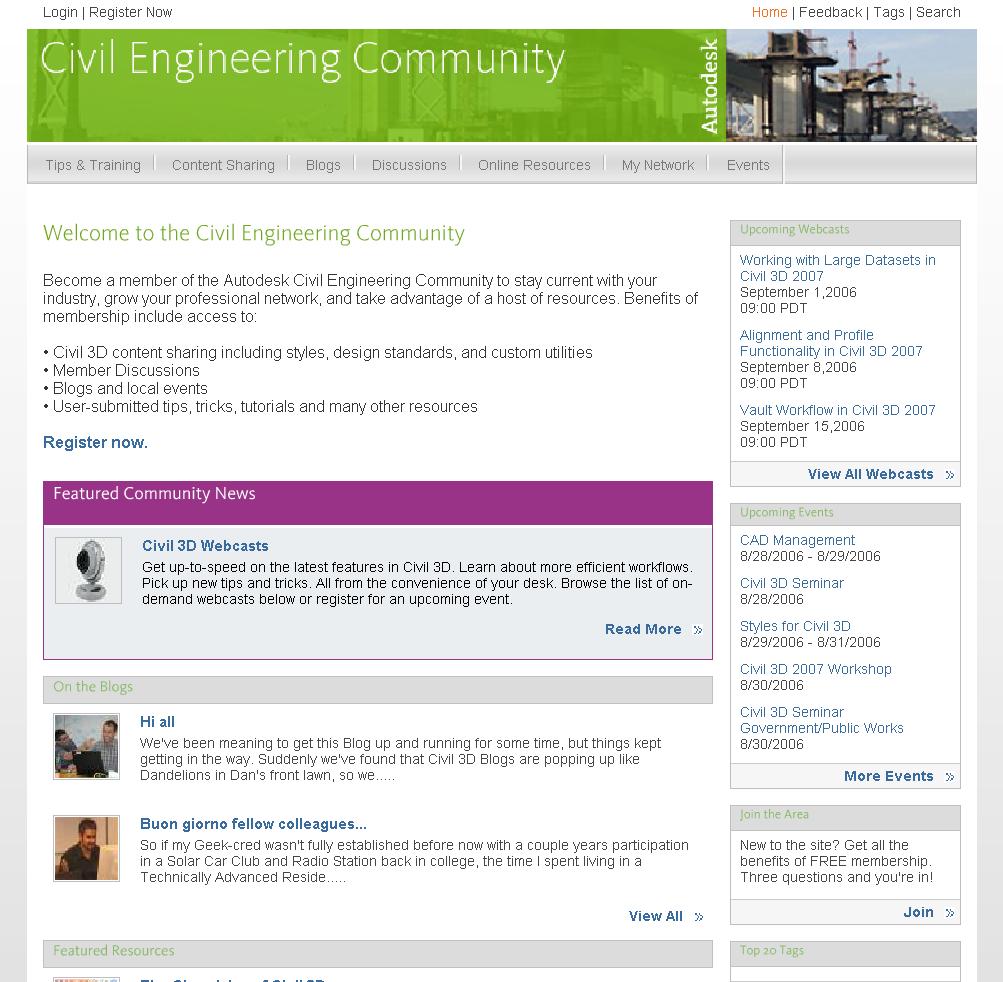
Autodesk is about to open a new section of their website. It is intended specifically for the Civil Engineering Community, which also happens to be the title. There visitors will find sections titled...
Tips & Training - tips, tricks, tutorials, training, how-tos, and workarounds
Content Sharing - area for sharing templates, styles, reports and utilities
Blogs - Two NEW Autodesk blogs** and links to many existing blogs
Discussions - links to existing peer-to-peer groups
Online Resourses - links to C.E. sites: jobs, 3rd party apps, directories
My Network - Establish industry contacts, meet users
Events - links to user groups, reseller events, seminars, and workshop
A similar site has existed for the Manufacturing Community and has been quite successful. I have interacted with this new site and know that it will become a very important resource for us (the Civil 3D user community). I look forward to it going live soon (hopefully within two weeks).
** The two NEW Autodesk Blogs are "The Dave and Dan Show" Dave Simeone, Civil 3D Product Manager, and Dan Philbrick, Civil 3D Development Manager, will have their own forum, and "Wicked Cool Stuff" by Anthony Governanti, Civil 3D Technical Marketing Manager. This site may cause hysteria among Anthony's fan club members.
Thursday, July 27, 2006
Two Worthwhile Downloads From The UK
Anthony Governanti, Autodesk ISD Technical Marketing Manager, recently pointed someone to one the following documents. I found them both worthwhile. They are:
How to Design a Junction in Civil 3D this one has a separate file called Junction Design.dwg
Corridor Surface Interactive Boundaries
The second document applies more to 2006.
Absolutely worthwhile imports!
I was a bit surprised that I had not seen them before.
How to Design a Junction in Civil 3D this one has a separate file called Junction Design.dwg
Corridor Surface Interactive Boundaries
The second document applies more to 2006.
Absolutely worthwhile imports!
I was a bit surprised that I had not seen them before.
Friday, July 21, 2006
The Chronicles of... Civil 3D
Coming soon to a theater near you. No, The next Civil 3D webcast scheduled for Friday July 28 at 12:00pm EDT, 9:00am PDT will be the first in a series of webcasts that will be reality TV on your computer screen (only not so cheesey). The series will be co-hosted by Darlene Estabrook, Civil Designer, Sitelines, and Anthony Governanti, Civil Technical Marketing Manager.
Here is Autodesks description...
Can a small-town engineering firm generate design plans for a commercial subdivision using Autodesk® Civil 3D®? That's the question we'll answer in this exciting new series of webcasts, which chronicle - in real time – the experiences of a Maine-based civil engineering firm attempting to complete a project on time and within budget. Thinking about migrating to Autodesk Civil 3D? Don't miss this insider's look at what it takes!
This series will provide a once a month look at the implementation process.
Sounds like... Must See PC!
Sorry I could not help myself.
Here is Autodesks description...
Can a small-town engineering firm generate design plans for a commercial subdivision using Autodesk® Civil 3D®? That's the question we'll answer in this exciting new series of webcasts, which chronicle - in real time – the experiences of a Maine-based civil engineering firm attempting to complete a project on time and within budget. Thinking about migrating to Autodesk Civil 3D? Don't miss this insider's look at what it takes!
This series will provide a once a month look at the implementation process.
Sounds like... Must See PC!
Sorry I could not help myself.
Dave & Dan Show co-Starring Anthony a Big Hit!
Today's Civil 3D webcast titled "Dave and Dan Show" was worthwhile. Dave Simeone, Civil 3D Product Manager, and Dan Philbrick, Civil 3D Development Manager along with Anthony Governanti ISD Technical Marketing Manager provided an excellent fast and furious (on-the-fly) Q & A session.
They attempted to answer and demonstate as many posted questions from viewers at home, I mean at work, that they could fit into one hour.
They covered subjects like...
Showing a crossing pipe in a profile
Labeling a crossing Pipe in profile
Creating ROW parcels
Renumbering parcels
Parcel display order
Using surface styles
Editing surface styles
Using the TOOLBOX (new in 2007)
They previewed a utility that should be free and available shortly
Rotating point labels
Transparent commands
Design curb return profiles (using Transparent commands)
Using the Inquiry Tool
Listing Points
Clearly a lot was covered. If you missed it, or if you blinked, Look for this webcast to be available soon among the recorded sessions.
They attempted to answer and demonstate as many posted questions from viewers at home, I mean at work, that they could fit into one hour.
They covered subjects like...
Showing a crossing pipe in a profile
Labeling a crossing Pipe in profile
Creating ROW parcels
Renumbering parcels
Parcel display order
Using surface styles
Editing surface styles
Using the TOOLBOX (new in 2007)
They previewed a utility that should be free and available shortly
Rotating point labels
Transparent commands
Design curb return profiles (using Transparent commands)
Using the Inquiry Tool
Listing Points
Clearly a lot was covered. If you missed it, or if you blinked, Look for this webcast to be available soon among the recorded sessions.
Friday, May 05, 2006
Civil 3D 2007 - Corridor to Google Earth
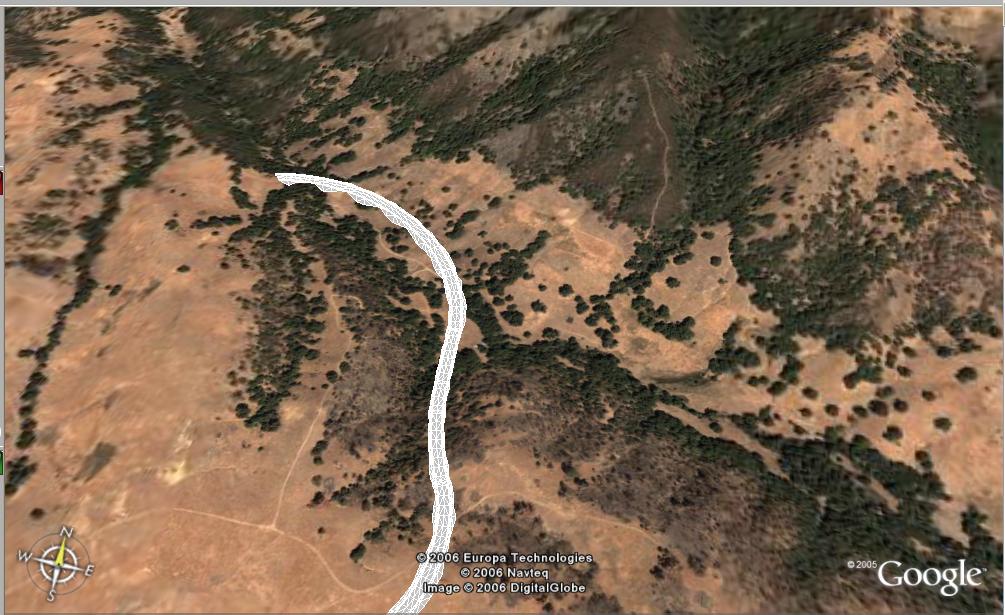
There is so much to share, and not nearly enough time to do so. Here is a super quick item.
Today, during the webcast, Anthony Governanti, Technical Marketing Manager for Autodesk, shared a hidden command in Civil 3D 2007. EXPORTGOOGLEEARTH.
This command allows you to pick a corridor with a corridor surface in a drawing that has a coordinate system assigned and have the surface of the corridor exported to Google Earth.
Wednesday, March 29, 2006
Anthony's Thoughts
Today, many resellers attended a webcast that described what will be available for us to refer to, and what is in the box (Civil 3D 2007), that can be used to learn, teach, and guide.
One segment of the webcast presented by Anthony Governanti, Technical Marketing Manager for Autodesk, was the "Wicked Cool Stuff" according to him.
The following is his list (in no particular order):
Text masking! Available in all labels!
Expressions – add calculations to any label
Reference text (that can use...)
---Alignments
---Profiles
---Parcels
---Surfaces
General Note (object)
Quick Profile
DWF Preview for Project Data
Grading Feature Line tools (3D polyline tools and more)
Grading that works!
---Inside corner cleanup
---Projection to surface
Graphical Corridor Editing
New Subassemblies
---Retaining walls
---Channels
---Pipe trench
---Many more
New templates
---National CAD Standards (NCS) based
---Extended to include Civil 3D specific objects
---Includes styles to replicate LDT output
Too much to list!
Although, much of this information has been discussed here and elsewhere, it was certainly very useful for me to see Anthony's highlight reel.
PS. I want to thank Anthony for his OK to use his list.
One segment of the webcast presented by Anthony Governanti, Technical Marketing Manager for Autodesk, was the "Wicked Cool Stuff" according to him.
The following is his list (in no particular order):
Text masking! Available in all labels!
Expressions – add calculations to any label
Reference text (that can use...)
---Alignments
---Profiles
---Parcels
---Surfaces
General Note (object)
Quick Profile
DWF Preview for Project Data
Grading Feature Line tools (3D polyline tools and more)
Grading that works!
---Inside corner cleanup
---Projection to surface
Graphical Corridor Editing
New Subassemblies
---Retaining walls
---Channels
---Pipe trench
---Many more
New templates
---National CAD Standards (NCS) based
---Extended to include Civil 3D specific objects
---Includes styles to replicate LDT output
Too much to list!
Although, much of this information has been discussed here and elsewhere, it was certainly very useful for me to see Anthony's highlight reel.
PS. I want to thank Anthony for his OK to use his list.
Friday, March 24, 2006
Wow!
I just watched the weekly webcast in which Autodesk introduced Civil 3D 2007. The first thing that amazed me was the number of attendees. I noticed the peak at about 9:20 of over 980 attendees. Awesome.
OK, on to the important stuff.
Dave Simeone and Anthony Governanti did a great job of very quickly (they only had 1 hour) demonstrating some of the new capabilities. Much of it had already been described, here and in other blogs, but to see this live is very different.
I few memorable items for me were...
Labels with masks
Labels with expressions (formulas)
Labels that referenced multiple objects and object types
Generic Note with intelligent layout viewport resizing
The entirely revamped Help documentation
Better surface elimination of flat triangles
Quick Profiles
Inclusion of base feature line in Quick Profiles
Many new Grading Feature Line tools
Autodesk Vault to manage projects
Added project support for Pipes
Survey functionality (similar to Survey add-on to Land Desktop) in the box
Graphically edit Corridor model regions
Immediate creation of corridor surface in Prospector
Ability to graphically modify individual sections that affect corridor
Profile can contain fixed, floating, or free constraints (similar to horiz aligns)
Annotate Vertical Curve info in plan view
Interference checking for pipe networks
Import LDt pipe runs
Part Builder documented and exposed in UI
Replacement of VIZ Render with native AutoCAD tools
Whew!
They suggested that we all begin preparing for the arrival of 2007 which they stated will begin shipping in April.
Lastly, they answered eight and one half pages of questions asked via an input window.
Lots to process.
OK, on to the important stuff.
Dave Simeone and Anthony Governanti did a great job of very quickly (they only had 1 hour) demonstrating some of the new capabilities. Much of it had already been described, here and in other blogs, but to see this live is very different.
I few memorable items for me were...
Labels with masks
Labels with expressions (formulas)
Labels that referenced multiple objects and object types
Generic Note with intelligent layout viewport resizing
The entirely revamped Help documentation
Better surface elimination of flat triangles
Quick Profiles
Inclusion of base feature line in Quick Profiles
Many new Grading Feature Line tools
Autodesk Vault to manage projects
Added project support for Pipes
Survey functionality (similar to Survey add-on to Land Desktop) in the box
Graphically edit Corridor model regions
Immediate creation of corridor surface in Prospector
Ability to graphically modify individual sections that affect corridor
Profile can contain fixed, floating, or free constraints (similar to horiz aligns)
Annotate Vertical Curve info in plan view
Interference checking for pipe networks
Import LDt pipe runs
Part Builder documented and exposed in UI
Replacement of VIZ Render with native AutoCAD tools
Whew!
They suggested that we all begin preparing for the arrival of 2007 which they stated will begin shipping in April.
Lastly, they answered eight and one half pages of questions asked via an input window.
Lots to process.
Subscribe to:
Posts (Atom)
