As announced by Dan Philbrick, Autodesk's Civil 3D Software Development Manager, in the blog he shares with Dave Simeone, "The Dave and Dan Civil 3D Show" Autodesk has just released one new whitepaper and updated a previous whitepaper.
The new whitepaper is titled:
Best Practices for Working with Large Data Sets
The updated whitepaper is:
Civil 3D 2008 Project Management Using Autodesk Vault
Lastly, Dan mentions technical solution 1071001 that involves enabling Window to over-ride the 2GB limit for applications and allow Civil 3D to use 3GB of physical memory to improve performance.
All of this information is very useful and much appreciated. Thanks Autodesk.
Showing posts with label Philbrick. Show all posts
Showing posts with label Philbrick. Show all posts
Friday, June 08, 2007


Friday, April 06, 2007
Today's (OOPS Last Weeks) Webcast (3-30-07)
I thought that I had posted this. Apparently not. Sorry. ACE
One thing became apparent to me during today's Civil 3D webcast titled "Introduction to AutoCAD Civil 3D 2008", and that was that Autodesk has been listening to the suggestions, complaints, and wishes from users. There were many usability enhancements shown during the one hour webcast by Dave Simeone (Civil 3D Senior Product Manager) and Dan Philbrick (Civil 3D Development Manager).
As I have been learning about Civil 3D 2008 I have been surprised by how many little improvements were added, where I found myself thinking "Yeah, this is better. Yes, I would prefer to do that this way instead of the old way".
I am looking forward to doing more with, and learning more about, 2008. Training demands do limit my learning time, but when I do get to learn I am very pleased with the results.
"Like what?" you may ask. Well, here are a few small things that caught my attention:
One thing became apparent to me during today's Civil 3D webcast titled "Introduction to AutoCAD Civil 3D 2008", and that was that Autodesk has been listening to the suggestions, complaints, and wishes from users. There were many usability enhancements shown during the one hour webcast by Dave Simeone (Civil 3D Senior Product Manager) and Dan Philbrick (Civil 3D Development Manager).
As I have been learning about Civil 3D 2008 I have been surprised by how many little improvements were added, where I found myself thinking "Yeah, this is better. Yes, I would prefer to do that this way instead of the old way".
I am looking forward to doing more with, and learning more about, 2008. Training demands do limit my learning time, but when I do get to learn I am very pleased with the results.
"Like what?" you may ask. Well, here are a few small things that caught my attention:
- Extract object from surface (i.e. Contour, Boundary)
- Modify objects via Properties (that is the AutoCAD Properties window)
- "Assign Elevations" during feature line creation (from Surface or Grading).
- Collapse and Expand baselines and regions in Corridor Properties dialog box.
- "Set All Frequencies" in Corridor Properties dialog box.
- Boundary creation for corridor surfaces now use a jig line (like parcels automatic mode).
- Create Profile View now uses a wizard.
- Section View Group Properties (change all sections views at once).
- New Workspace.
- Move blocks to surface elevation.
- Automatic Plan Production
- Vault enhancements
- 2-10 faster corridor creation
- New "Lines and Curves" menu pulldown.
- DWF files will include object data
- Google Earth import/export
Now, back to training.
Wednesday, November 08, 2006
Cul-De-Sacs Fix in SP3
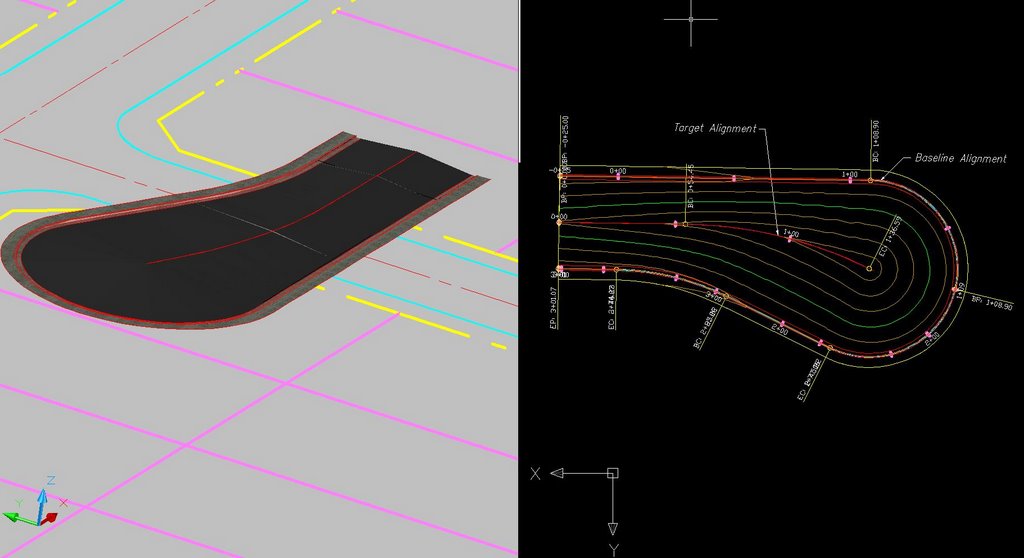
Dan Philbrick, Autodesk Civil 3D Software Development Manager, mentioned in his blog, in the Civil Engineering Community, that Service Pack 3 fixes an issue that has existed when trying to design cul-de-sac corridors with arcs in the centerline alignment.
If our baseline was run around the cul-de-sac bulb entirely as one alignment and had as its target an centerline alighnment with an arc, the assemblies would not solve correctly and leave a flat teardrop shaped gap in the middle of the corridor. This did not happen if the centerline alignment was a tangent (straight).
The necessary workaround was to create two alignments around the bulb of the cul-de-sac each targeting the centerline alignment with the arc.
With the fix provide by Service Pack 3 we no longer need to create the two alignments and can accomplish this goal with one alignment if we so choose.

I went back through the ...README.htm file to see if this was mentioned. I could not find any mention of it. Either way this is a very good thing.
Too bad my Autodesk University "Cul-de-Sacs Are Not a Dead End" class handouts were already submitted. Oh well, I will just have to mention that that was fixed.
If our baseline was run around the cul-de-sac bulb entirely as one alignment and had as its target an centerline alighnment with an arc, the assemblies would not solve correctly and leave a flat teardrop shaped gap in the middle of the corridor. This did not happen if the centerline alignment was a tangent (straight).
The necessary workaround was to create two alignments around the bulb of the cul-de-sac each targeting the centerline alignment with the arc.
With the fix provide by Service Pack 3 we no longer need to create the two alignments and can accomplish this goal with one alignment if we so choose.
I went back through the ...README.htm file to see if this was mentioned. I could not find any mention of it. Either way this is a very good thing.
Too bad my Autodesk University "Cul-de-Sacs Are Not a Dead End" class handouts were already submitted. Oh well, I will just have to mention that that was fixed.
Tuesday, October 03, 2006
Vault and Shortcuts Future (Interesting Read)
If you have not already read the most recent post in the blog by Dave Simeone, Civil 3D Product Manager, and Dan Philbrick, Civil 3D Development Manager, about Civil 3D 2007, Vault and Data Shortcuts, I STRONGLY ENCOURAGE you to do so. Simply click on the title of this post to see what Dan says about these subjects.
He also mentions that anyone that wished to be a part of the beta program for their plans, they can make it so.
Lastly, Dan states that they will provide more details this Friday during the weekly webcast. Do not forget, to view the weekly webcasts it is necessary to register.
He also mentions that anyone that wished to be a part of the beta program for their plans, they can make it so.
Lastly, Dan states that they will provide more details this Friday during the weekly webcast. Do not forget, to view the weekly webcasts it is necessary to register.
Friday, September 22, 2006
No New Templates Needed!
If you read the Service Pack 2 Readme file, you may have noticed the following section.
Important: The following standard template files (*.dwt) have been recreated due to issues found with Pipe Network Parts Lists. Some Network parts lists may be corrupt if you use .dwt files from the Autodesk Civil 3D 2007 release. The new template files will be posted at http://civilcommunity.autodesk.com/.
Well, it turns out that the templates were fine all along and Autodesk will not be posting new templates. Dan Philbrick, Autodesk Civil 3D Development Manager, stated in the Civil 3D discussion group the following:
"We thought we had an issue with the templates and decided to put a note in the readme. However, we did not want to release new templates unless we really thought it was necessary. Upon further research we found that the existing templates are fine - no need for new templates."
I hope this clarifies some confusion.
Important: The following standard template files (*.dwt) have been recreated due to issues found with Pipe Network Parts Lists. Some Network parts lists may be corrupt if you use .dwt files from the Autodesk Civil 3D 2007 release. The new template files will be posted at http://civilcommunity.autodesk.com/.
Well, it turns out that the templates were fine all along and Autodesk will not be posting new templates. Dan Philbrick, Autodesk Civil 3D Development Manager, stated in the Civil 3D discussion group the following:
"We thought we had an issue with the templates and decided to put a note in the readme. However, we did not want to release new templates unless we really thought it was necessary. Upon further research we found that the existing templates are fine - no need for new templates."
I hope this clarifies some confusion.
Monday, August 28, 2006
Coming Soon - Civil 3D Community
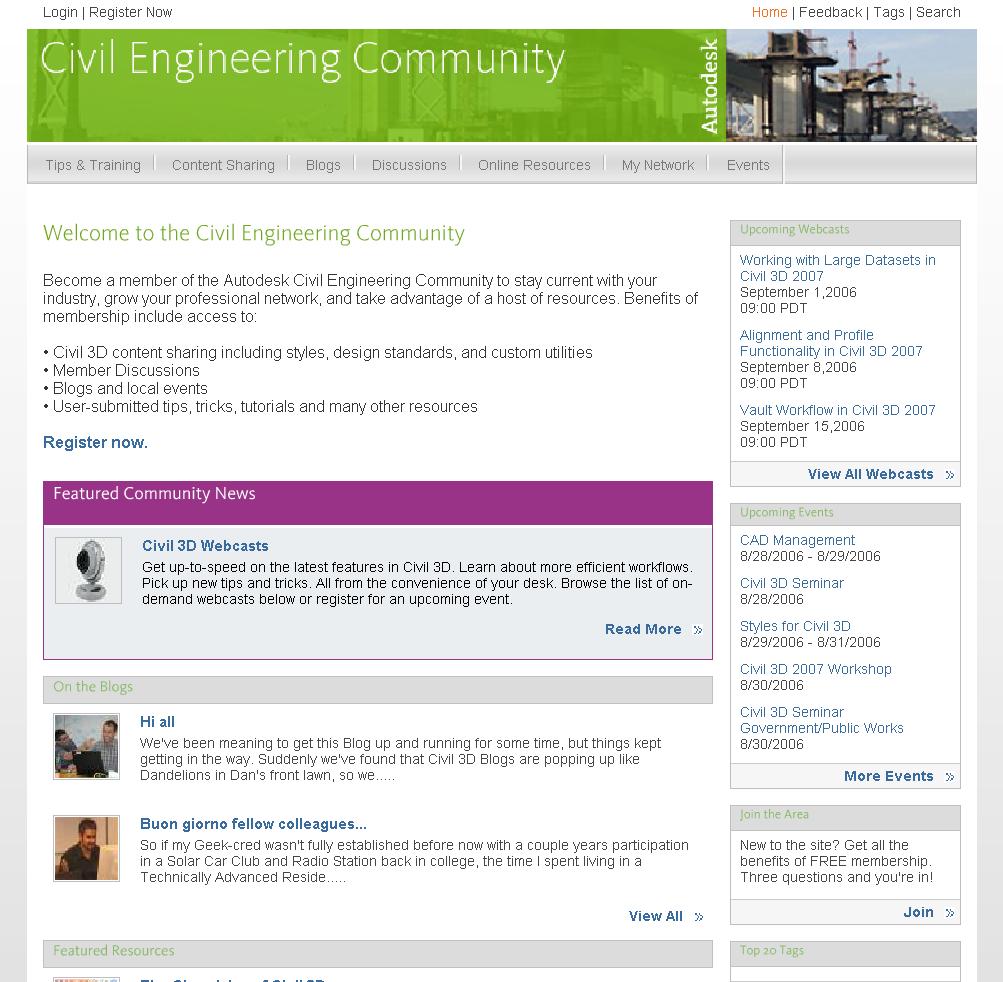
Autodesk is about to open a new section of their website. It is intended specifically for the Civil Engineering Community, which also happens to be the title. There visitors will find sections titled...
Tips & Training - tips, tricks, tutorials, training, how-tos, and workarounds
Content Sharing - area for sharing templates, styles, reports and utilities
Blogs - Two NEW Autodesk blogs** and links to many existing blogs
Discussions - links to existing peer-to-peer groups
Online Resourses - links to C.E. sites: jobs, 3rd party apps, directories
My Network - Establish industry contacts, meet users
Events - links to user groups, reseller events, seminars, and workshop
A similar site has existed for the Manufacturing Community and has been quite successful. I have interacted with this new site and know that it will become a very important resource for us (the Civil 3D user community). I look forward to it going live soon (hopefully within two weeks).
** The two NEW Autodesk Blogs are "The Dave and Dan Show" Dave Simeone, Civil 3D Product Manager, and Dan Philbrick, Civil 3D Development Manager, will have their own forum, and "Wicked Cool Stuff" by Anthony Governanti, Civil 3D Technical Marketing Manager. This site may cause hysteria among Anthony's fan club members.
Friday, July 21, 2006
Dave & Dan Show co-Starring Anthony a Big Hit!
Today's Civil 3D webcast titled "Dave and Dan Show" was worthwhile. Dave Simeone, Civil 3D Product Manager, and Dan Philbrick, Civil 3D Development Manager along with Anthony Governanti ISD Technical Marketing Manager provided an excellent fast and furious (on-the-fly) Q & A session.
They attempted to answer and demonstate as many posted questions from viewers at home, I mean at work, that they could fit into one hour.
They covered subjects like...
Showing a crossing pipe in a profile
Labeling a crossing Pipe in profile
Creating ROW parcels
Renumbering parcels
Parcel display order
Using surface styles
Editing surface styles
Using the TOOLBOX (new in 2007)
They previewed a utility that should be free and available shortly
Rotating point labels
Transparent commands
Design curb return profiles (using Transparent commands)
Using the Inquiry Tool
Listing Points
Clearly a lot was covered. If you missed it, or if you blinked, Look for this webcast to be available soon among the recorded sessions.
They attempted to answer and demonstate as many posted questions from viewers at home, I mean at work, that they could fit into one hour.
They covered subjects like...
Showing a crossing pipe in a profile
Labeling a crossing Pipe in profile
Creating ROW parcels
Renumbering parcels
Parcel display order
Using surface styles
Editing surface styles
Using the TOOLBOX (new in 2007)
They previewed a utility that should be free and available shortly
Rotating point labels
Transparent commands
Design curb return profiles (using Transparent commands)
Using the Inquiry Tool
Listing Points
Clearly a lot was covered. If you missed it, or if you blinked, Look for this webcast to be available soon among the recorded sessions.
Thursday, June 22, 2006
SP1A Coming Soon & Misinformation
It seems that some users have been told to not install SP1 because it breaks "existing things that work" while attempting to fix others.
Additionally, these same people are being told that once SP1 is installed in order to install SP1A (due any day now) they will have to do a full product uninstall, reinstall, then apply SP1A.
The second item is completely incorrect. Dan Philbrick, Autodesk Civil 3D Development Manager, has stated in the Discussion Groups the following:
First Comment from Dan-
You will not have to install SP1 first. SP1A will include all of the fixes
in SP1.
If you have already installed SP1, you can apply SP1A and get the fix to the
parcel labeling scaling issue.
Second Comment from Dan-
The SP1A is going to resolve the parcel label scaling issue in Paperspace.
You will not have to remove the SP1. SP1A will apply to a computer with SP1
already installed.
Back to the first item, it is partially incorrect in that SP1A will address one item that SP1 broke. The problem created has to do with parcel labels not being visible in Layout Viewports. This was mentioned here on Monday June 19th, as was the workaround.
I believe users absolutely do benefit from installing SP1 and they can use the workaround if necessary. If SP1A comes out soon this issues will go away.
However this brings up the main reason for this post. It is difficult enough determining courses of action without getting wrong or bad information from sources that are considered trusted.
Additionally, these same people are being told that once SP1 is installed in order to install SP1A (due any day now) they will have to do a full product uninstall, reinstall, then apply SP1A.
The second item is completely incorrect. Dan Philbrick, Autodesk Civil 3D Development Manager, has stated in the Discussion Groups the following:
First Comment from Dan-
You will not have to install SP1 first. SP1A will include all of the fixes
in SP1.
If you have already installed SP1, you can apply SP1A and get the fix to the
parcel labeling scaling issue.
Second Comment from Dan-
The SP1A is going to resolve the parcel label scaling issue in Paperspace.
You will not have to remove the SP1. SP1A will apply to a computer with SP1
already installed.
Back to the first item, it is partially incorrect in that SP1A will address one item that SP1 broke. The problem created has to do with parcel labels not being visible in Layout Viewports. This was mentioned here on Monday June 19th, as was the workaround.
I believe users absolutely do benefit from installing SP1 and they can use the workaround if necessary. If SP1A comes out soon this issues will go away.
However this brings up the main reason for this post. It is difficult enough determining courses of action without getting wrong or bad information from sources that are considered trusted.
Monday, June 19, 2006
Civil 3D 2007 - SP1A On Its Way
Civil 3D 2007 Service Pack 1 seems to correct several issues with the product, but there is one item that it seems to break (there is a work-around, see below).
A couple of users pointed this out to me and there is mention of it in the Discussion Groups also. When you have a Parcel with Labels in ModelSpace everything appears fine. Then when you switch to PaperSpace (a Layout) the Parcels Labels disappers. This is not good.
Dan Philbrick the Autodesk Civil 3D Development Manager mentioned in the Discussion Groups that Service Pack 1A (which corrects this one issue) should be available Wednesday, June 21, 2006.
Workaround: In order to plot properly from a layout you can use either Land Desktop or Land Enabled Autodesk Map.
If I have not stated it lately the Discussion Groups are a GREAT way to...
get questions answered...
find tips, tricks, and workarounds...
see what is causing others issues...
offer advice for the benefit of the industry...
make requests and wishes...
BASICALLY IMPROVE!
A couple of users pointed this out to me and there is mention of it in the Discussion Groups also. When you have a Parcel with Labels in ModelSpace everything appears fine. Then when you switch to PaperSpace (a Layout) the Parcels Labels disappers. This is not good.
Dan Philbrick the Autodesk Civil 3D Development Manager mentioned in the Discussion Groups that Service Pack 1A (which corrects this one issue) should be available Wednesday, June 21, 2006.
Workaround: In order to plot properly from a layout you can use either Land Desktop or Land Enabled Autodesk Map.
If I have not stated it lately the Discussion Groups are a GREAT way to...
get questions answered...
find tips, tricks, and workarounds...
see what is causing others issues...
offer advice for the benefit of the industry...
make requests and wishes...
BASICALLY IMPROVE!
Friday, June 16, 2006
Civil 3D - Undocumented Command
While addressing questions in the Disscussion Groups Dan Philbrick, Autodesk Civil 3D Development Manager, shared what he called an UNSUPPORTED/UNDOCUMENTED command. It is AecInspect.
This command asks users to "Hover over entity to inspect:" It then returns in a tooltip the type of entity hovered over and the entity's layer (see image).
The original question about determining the layer of an entity's subcomponent can not be determined via this command but I am sure that some will find this command very helpful.
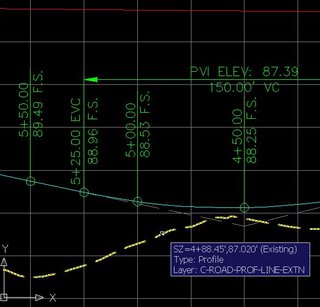
This command asks users to "Hover over entity to inspect:" It then returns in a tooltip the type of entity hovered over and the entity's layer (see image).
The original question about determining the layer of an entity's subcomponent can not be determined via this command but I am sure that some will find this command very helpful.

Wednesday, March 22, 2006
Civil 3D Weekly Webcasts
You may want to take a close look at the recently released schedule of topics for the Autodesk Civil 3D weekly webcasts. As a matter of fact, to view this Friday's webcast you have to register. Click on the title of this post to get to the webcasts page and to register.
This Friday the Dave & Dan show (Dave Simeone, Civil 3D Product Manager, Dan Philbrick, Civil 3D Development Manager) will formally introduce Autodesk Civil 3D 2007. We will see and hear things straight from the horses mouths (so to speak).
Upcoming sessions include:
3/31/06 – Civil 3D 2007 Project Capabilities
4/07/06 – Digging in to Civil 3D 2007 Survey Capabilities
4/14/06 – New Grading Capabilities in Civil 3D 2007
4/21/06 – New Production Drafting Capabilities in Civil 3D 2007
4/28/06 – Use Digital Elevation Models (DEMs) and Satellite Imagery with Autodesk Civil 3D and Autodesk Raster Design
Don't forget to register in advance for this Friday's webcast!
This Friday the Dave & Dan show (Dave Simeone, Civil 3D Product Manager, Dan Philbrick, Civil 3D Development Manager) will formally introduce Autodesk Civil 3D 2007. We will see and hear things straight from the horses mouths (so to speak).
Upcoming sessions include:
3/31/06 – Civil 3D 2007 Project Capabilities
4/07/06 – Digging in to Civil 3D 2007 Survey Capabilities
4/14/06 – New Grading Capabilities in Civil 3D 2007
4/21/06 – New Production Drafting Capabilities in Civil 3D 2007
4/28/06 – Use Digital Elevation Models (DEMs) and Satellite Imagery with Autodesk Civil 3D and Autodesk Raster Design
Don't forget to register in advance for this Friday's webcast!
Thursday, November 17, 2005
Discussion Groups
For those of you that may not be aware, online Discussion Groups allow participants to "discuss" the topic of that particular "group". Autodesk has for many years hosted discussion groups for many of their products.
This allows users of these products to post question or problems, provide answers to others, present wish list items for consideration, and the ability to network.
There are a couple of ways that one can view the discussion groups. The first method is to use an internet browser. The title of this post is linked to the online discussion group for Autodesk's Civil 3D. Another method is to use a news reader such as Outlook Express. This method allows you to find, view and download for offline viewing, conversations (threads). It also allows you to mark those that are of particular interest.
The most important aspect of discussion groups is that they bring together users from around the world. We can either gain by their answers to our questions or learn from the issues that they may be having. Oh, and of course that all of this information can be searched to address our needs.
The Civil 3D discussion group is a FANTASTIC way to keep abreast of the product. The increased volume of discussion within this group is a clear indicator of the increased interest and use of Civil 3D. Best of all it is FREE.
Note: After monitoring these discussion groups for a period of time you may notice that some post'ers comments are more useful than others. Look for Autodesk'ers like Dave Simeone - Civil 3D Product Manager, and Dan Philbrick - Civil 3D Engineering Manager. James Wedding's comments, among many other's, are also very helpful.
We owe a debt of gratitude to all who contribute their knowledge, and time, and by doing so, make the entire user community BETTER!
This allows users of these products to post question or problems, provide answers to others, present wish list items for consideration, and the ability to network.
There are a couple of ways that one can view the discussion groups. The first method is to use an internet browser. The title of this post is linked to the online discussion group for Autodesk's Civil 3D. Another method is to use a news reader such as Outlook Express. This method allows you to find, view and download for offline viewing, conversations (threads). It also allows you to mark those that are of particular interest.
The most important aspect of discussion groups is that they bring together users from around the world. We can either gain by their answers to our questions or learn from the issues that they may be having. Oh, and of course that all of this information can be searched to address our needs.
The Civil 3D discussion group is a FANTASTIC way to keep abreast of the product. The increased volume of discussion within this group is a clear indicator of the increased interest and use of Civil 3D. Best of all it is FREE.
Note: After monitoring these discussion groups for a period of time you may notice that some post'ers comments are more useful than others. Look for Autodesk'ers like Dave Simeone - Civil 3D Product Manager, and Dan Philbrick - Civil 3D Engineering Manager. James Wedding's comments, among many other's, are also very helpful.
We owe a debt of gratitude to all who contribute their knowledge, and time, and by doing so, make the entire user community BETTER!
Subscribe to:
Posts (Atom)
